

Best Printable Crochet Project Planner 2026
Table of Contents
- What Makes a Great Crochet Project Planner in 2026
- Top Printable Crochet Project Planners Reviewed
- Using a Crochet Project Tracker Template Effectively
- Yarn Stash Inventory Printable: What to Track
- How to Track Crochet Project Progress Step by Step
- Planner Features for Every Skill Level and Crafter
- How to Print and Bind Your Crochet Planner at Home
- Conclusion
Last Updated: August 15, 2026
Most crafters fail not from lack of talent but from losing track of projects, yarn, and progress. A well-designed crochet project planner solves this problem. This guide reviews the best printable crochet project planner options available in 2026, breaks down what features matter, and helps you choose the right format for your workflow.
Quick Picks:
- Best Free Option: Free Ultimate Crochet Planner (120 Pages), comprehensive, instant download, zero cost
- Best Value Paid Option: Ultimate Crochet Planner Digital Download ($1.99), beautifully designed, full-featured
- Best For: Any crafter who wants to stop losing track of projects and start finishing more of them
What Makes a Great Crochet Project Planner in 2026
A great crochet project planner is a structured printable or digital system that helps crafters track active projects, manage yarn stash, log finished objects, and plan future makes in one organized reference. The best planners include dedicated fields for fiber content, dye lot, gauge swatch results, crochet hook sizes, pattern source, and project timeline.

What separates a genuinely useful planner from a generic notebook is specificity. A crafter working on three WIPs simultaneously needs different pages than someone running a small commission business. The format should match the complexity of your craft life.
Essential Sections Every Planner Should Have
A well-rounded planner should include:
- Project planning pages: Pattern name, source, yarn weight, color palette, hook size, start date, and target completion date
- WIP log: A running list of works-in-progress with status indicators and priority notes
- Finished object log: A record of completed projects with photos, recipient, and modifications made
- Yarn stash inventory: Fiber content, dye lot, yardage requirements, weight, brand, and storage location
- Pattern library: Where the pattern lives, purchase date, and personal notes
- Crochet goals: Monthly and annual goal-setting pages
- Notions tracker: Stitch markers, buttons, zippers, stuffing, and other small supplies
- Commission tracker: Client name, deadline, agreed price, deposit received, and delivery status
The planners that crafters actually use balance anticipating these needs without requiring 40 fields per project.
Digital vs. Physical: Choosing the Right Format
A physical planner printed at home offers tactile experience and quick page-flipping without screen distraction. The downside: you can't search it, and lost pages are gone.
A digital planner on a tablet with annotation apps like GoodNotes or Notability combines visual layout with searchability and backup. Many crafters print core tracking pages (yarn stash, WIP log) and keep goal-setting and pattern library pages digital.
According to Craft Industry Alliance research on craft consumer habits, digital downloads have become the dominant format for craft planning tools because instant access removes friction between deciding to organize and actually starting.
Start with a printed version to build the habit, then migrate to a hybrid workflow once you know which pages you actually use.
Top Printable Crochet Project Planners Reviewed
The market for printable crochet planners in 2026 ranges from free lead magnets to comprehensive 120-page systems. Here are two standout options from Crochet Creations Hub.
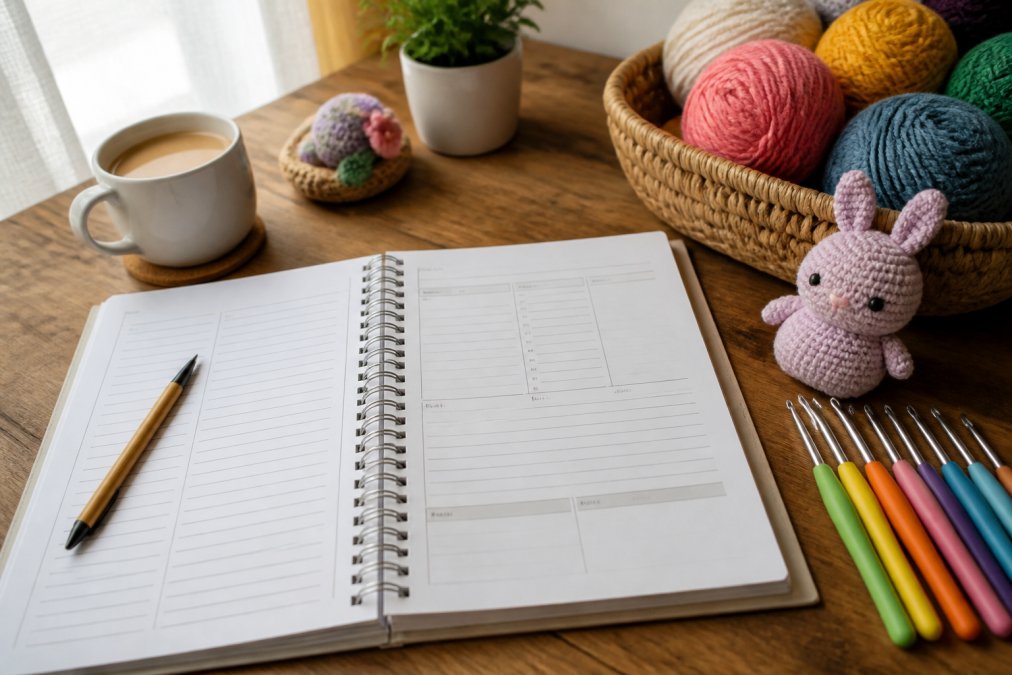
Free Ultimate Crochet Planner (120 Pages)
The Free Ultimate Crochet Planner is a comprehensive free crochet project planner available as an instant download PDF. At 120 pages, it covers every tracking need a serious crafter has, from yarn stash inventory to commission tracking, at zero cost.
This is the option to recommend to any crafter skeptical about whether a planner will help. The zero-cost entry point lets you test the system, see which pages you use most, and build an organizing habit before committing to anything.
What makes it stand out against other free printables is the depth. Most free crochet planners offer five to ten pages of basic tracking. This one includes a complete craft organization system with dedicated sections for annual planning, monthly goal-setting, project progress logs, and pattern library. The PDF is formatted for standard letter-size printing with no scaling adjustments needed.
Best for: Any crafter at any skill level who wants a complete craft organization system at no cost.
Ultimate Crochet Planner Digital Download ($1.99)
The Ultimate Crochet Planner Digital Download at $1.99 is the premium version with a more polished visual layout and additional features suited to crafters who want their planner to feel as good as it functions.

At under two dollars, this is one of the most accessible paid craft organization tools available. The paid version includes enhanced crochet inventory pages, a more detailed crochet notebook structure, and layout refinements that make it more pleasant to use daily. It's also a strong option for gift-giving.
Best for: Crafters who want a polished, full-featured planner and don't mind a minimal investment for a better experience.
| Feature | Free Planner (120 Pages) | Paid Planner ($1.99) |
|---|---|---|
| Page count | 120 pages | Full-featured PDF |
| Yarn stash inventory | Yes | Yes, enhanced |
| WIP log | Yes | Yes |
| Commission tracker | Yes | Yes |
| Pattern library | Yes | Yes |
| Print size | Letter (8.5" x 11") | Letter (8.5" x 11") |
| Cost | $0.00 | $1.99 |
| Instant download | Yes | Yes |
Using a Crochet Project Tracker Template Effectively
A crochet project tracker template is only as useful as the habit you build around it. The most common mistake is filling in a project page when starting a new make, then never updating it until details are forgotten.
Treat your planner like a project log, not a filing cabinet. Update it at the end of every session, even if it's just noting where you stopped in the pattern.
WIP Log and Project Progress Pages
The WIP log is the heartbeat of any crochet project tracker. A well-designed WIP log captures each active project on a single line: project name, yarn used, hook size, current row or round, and next action. This gives you a one-glance view of everything in progress.
Project progress pages go deeper, recording gauge swatch results, pattern modifications, yarn substitutions, and notes about what worked. Many crafters skip these pages early on and regret it when wanting to remake an item and can't remember what changes they made.
According to Ravelry's guide to project tracking for crocheters, detailed project notes are the single most requested feature among organized crafters and the most commonly skipped.
Pattern Library and Commission Tracking Fields
A pattern library section turns your crochet planner into a searchable personal archive. Each entry should capture the pattern name, designer or source, acquisition date, and a one-line note about what it's for. This prevents buying the same pattern twice or spending twenty minutes hunting for a PDF you know you have.
Commission tracking turns a crochet project planner into a small business tool. Dedicated commission tracker fields should include client name, item description, agreed price, deposit amount, deadline, and delivery date. Crafters who take commissions without tracking these details often undercharge, miss deadlines, or lose track of payments.
Yarn Stash Inventory Printable: What to Track
A yarn stash inventory printable is a dedicated set of pages for cataloging every skein in your stash. Without it, most crafters end up buying duplicate yarn, forgetting what they have, or starting projects they can't finish.
Every yarn stash entry should include:
- Yarn name and brand
- Fiber content (wool, acrylic, cotton, blend)
- Yarn weight (fingering, DK, worsted, bulky)
- Color name and number
- Dye lot number
- Total yardage requirements for planned projects
- Quantity on hand (number of skeins, partial amounts)
- Storage location (bin number, shelf, basket)
- Purchased from and date
The yardage requirements field is particularly important. Many crafters track what they have but not what they need for planned projects, which leads to starting a blanket with three skeins when the pattern calls for seven.
How to Track Crochet Project Progress Step by Step
Tracking crochet project progress effectively comes down to a consistent system. Here's a practical workflow:
- Open a new project page when starting any new make. Record the pattern name, source, yarn details, hook size, and start date before picking up your hook.
- Log your gauge swatch results before beginning the main project. Note the hook size used and whether you adjusted from the pattern recommendation.
- Update your WIP log at the end of each session. Note the current row or round, any modifications made, and your next planned step.
- Record yarn usage as you go. Mark off skeins used and note partial amounts remaining.
- Note pattern deviations immediately. If you change a stitch count, substitute a yarn, or skip a section, write it down while it's fresh.
- Complete the finished object log when you bind off. Record the final yarn used, total time spent, any issues encountered, and whether you'd make it again.
- Update your stash inventory to reflect yarn consumed. This keeps your available yardage accurate for future planning.
This seven-step process takes less than five minutes per session once it becomes habit.
Planner Features for Every Skill Level and Crafter
The right crochet project planner feature set depends on where you are in your craft journey.
| Skill Level | Key Features Needed | Nice to Have |
|---|---|---|
| Beginner | WIP log, basic project page, hook size chart | Yarn stash inventory |
| Intermediate | Full project tracker, pattern library, stash inventory | Commission tracker, goal-setting pages |
| Advanced/Commission | Commission tracker, cost analysis, client log | Annual planner, finished object archive |
Accessibility and Ergonomic Planning Considerations
Crochet is a repetitive motion craft, and planning your sessions ergonomically matters. A well-designed planner can support this by including session length tracking and break reminders as part of the project progress log.
Practical ergonomic planning fields to look for:
- Session duration (how long you crocheted in each sitting)
- Hand and wrist comfort notes
- Project weight (heavier projects create more strain)
- Recommended break frequency for extended sessions
The American Occupational Therapy Association's guidance on repetitive strain prevention recommends taking a five-minute break for every thirty minutes of repetitive hand activity. Building this into your project timeline pages keeps it front of mind.
Cost-Per-Project Analysis Using Your Planner
Most crafters have no idea what their projects actually cost. A crochet planner with cost-tracking fields changes that.
Cost-per-project analysis records every material expense and compares it against time invested and (for commission work) the price charged:
Total project cost = Yarn cost + Notions cost + Pattern cost
For commission work: Hourly rate x Hours worked = Labor cost, then compare against your commission price to see whether you're actually making money.
Many crafters who start tracking costs discover they've been significantly undercharging for commissions or spending more on yarn than a finished item would sell for.
How to Print and Bind Your Crochet Planner at Home
Printing and binding a crochet planner at home is straightforward. Most printable planners are formatted for standard 8.5" x 11" letter paper.
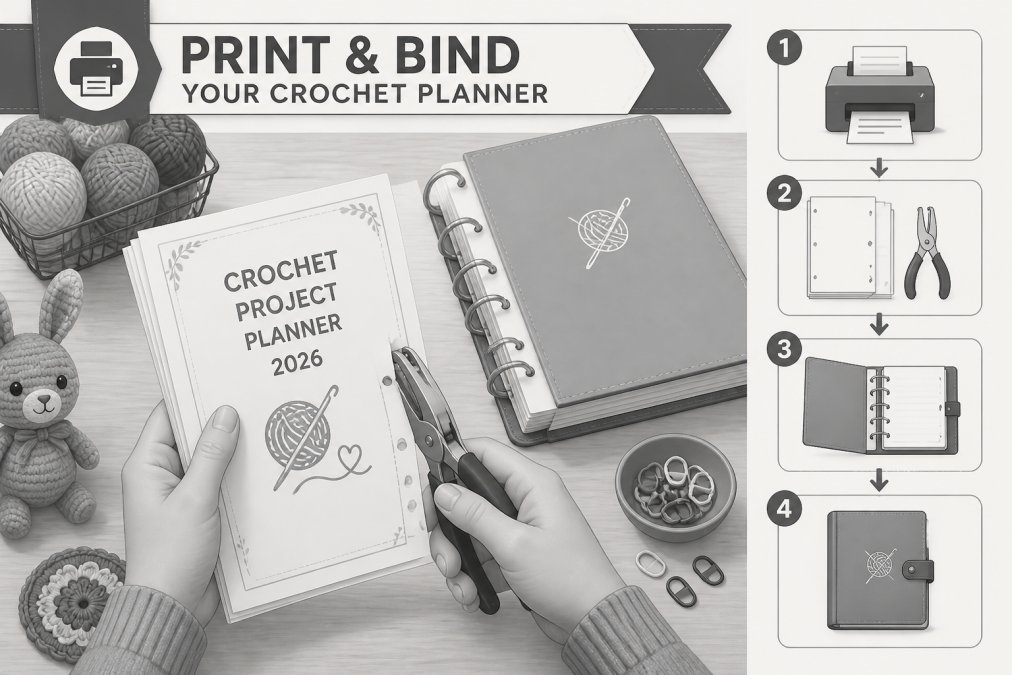
Step 1: Choose your print settings. Print at 100% scale to maintain correct margins. Use the highest quality setting your printer offers for pages you'll write on frequently.
Step 2: Select your paper. Standard 20 lb copy paper works, but 24 lb paper holds up better to daily handling and pen ink bleed-through. For cover pages, use 32 lb or cardstock.
Step 3: Decide on binding. The three most practical home binding options are:
- 3-ring binder (1" or 1.5"): Most flexible, add, remove, and rearrange pages freely.
- Comb binding: Clean, professional look. Requires a comb binding machine (under $30). Pages lay flat when open.
- Disc binding: Most expensive but allows pages to be added anywhere. Popular with crafters who want a customizable system.
Step 4: Organize before binding. Print all pages first, then sort them into sections before punching holes or binding. Use tabbed dividers to separate sections like yarn stash, WIP log, and pattern library.
Step 5: Add a cover. Print the cover page on cardstock and place it at the front. If your planner includes a back cover design, print that too for a finished look.
A complete 120-page planner printed double-sided uses roughly 60 sheets of paper. Printing only the sections you'll actively use reduces paper waste without losing functionality.
Frequently Asked Questions
What should be included in a crochet project planner?
A solid crochet project planner should include a WIP log, project progress pages, a yarn stash inventory with fields for fiber content, yarn weight, yardage requirements, and dye lot, plus a crochet hook size reference chart, pattern source notes, a finished object log, and goal-setting pages for monthly and annual planning. Bonus sections like a commission tracker, gauge swatch records, and a color palette log make the planner genuinely useful rather than decorative.
Are there free printable crochet planners available for 2026?
Yes. Crochet Creations Hub offers a free 120-page printable crochet project planner as an instant download PDF at no cost for a limited time. It covers yarn stash tracking, project timelines, pattern notes, and more. A premium version with additional organization tools is also available for $1.99. Both are formatted as printable PDFs sized to work on standard home printers.
Is a digital or printable crochet planner better?
It depends on your workflow. A printable crochet journal gives you a tactile, offline reference you can keep in your craft room or project bag without needing a device. A digital planner on a tablet lets you search entries and duplicate pages easily. Many crafters use both: a printed planner for active WIPs and a digital file for archiving finished objects and pattern library records. The best approach is whichever one you'll actually fill out consistently.
How do I organize my crochet projects and yarn stash?
Start by logging every active project in a WIP log with its pattern source, yarn weight, hook size, and estimated yardage requirements. Then catalog your yarn stash by fiber content, dye lot, and color palette. Use separate pages for finished objects and future project ideas. A printable crochet planner with dedicated sections for each category makes this much faster than a generic notebook, because the fields are already structured for crochet supplies specifically.
Can I use a standard planner for crochet projects?
A standard planner works for scheduling but lacks the fields crocheters actually need: yarn weight, hook sizes, gauge swatch notes, dye lot numbers, and yardage requirements. A dedicated crochet project tracker template is pre-built with those categories, saving you time setting up custom pages. If you already use a standard A5 size planner, you can print crochet-specific inserts and add them to your existing binder as a practical middle ground.
Staying organized is one of the most common challenges crafters face, especially when juggling multiple projects, a growing yarn stash, and a pattern library that's spread across bookmarks, PDFs, and physical books. Crochet Creations Hub offers both a free 120-page printable crochet planner and a $1.99 premium digital download, both available as instant download PDFs with no waiting and no shipping. Get your free pattern and start organizing your craft life today at Crochet Creations Hub.
This article was written using GrandRanker